Job steps and checklists
Each kind of job has steps: what gets done, and in what order. A new job starts with them as the checklist on its job card, so nothing gets forgotten, and they're ticked off on the phone.

How a job gets its steps
TradeMate works out the kind of job, in this order:
- From its quote. A job booked from a quote is the kind the quote was priced as.
- From its title. Otherwise, the job's title has to name the kind. "Switchboard upgrade at Priya's" gets the steps for a Switchboard upgrade.
A job that matches no kind starts with an empty checklist, and so do jobs from ServiceM8. You can still add steps to any job on its card.
Name jobs the way your kinds of job are named, and they'll pick up the right steps by themselves.
Changing a kind of job's steps
You start with your trade's steps, as a starting point. Make them yours in the web app:
- Go to Settings → Job steps, and click a kind of job.
- Change the words, or add a step in an empty row. Press More rows if you need them. A kind of job can have up to 20 steps.
- To drop a step, empty its row.
- Under Whose, choose who ticks it off: anyone on the job, or one role.
- Press Save.
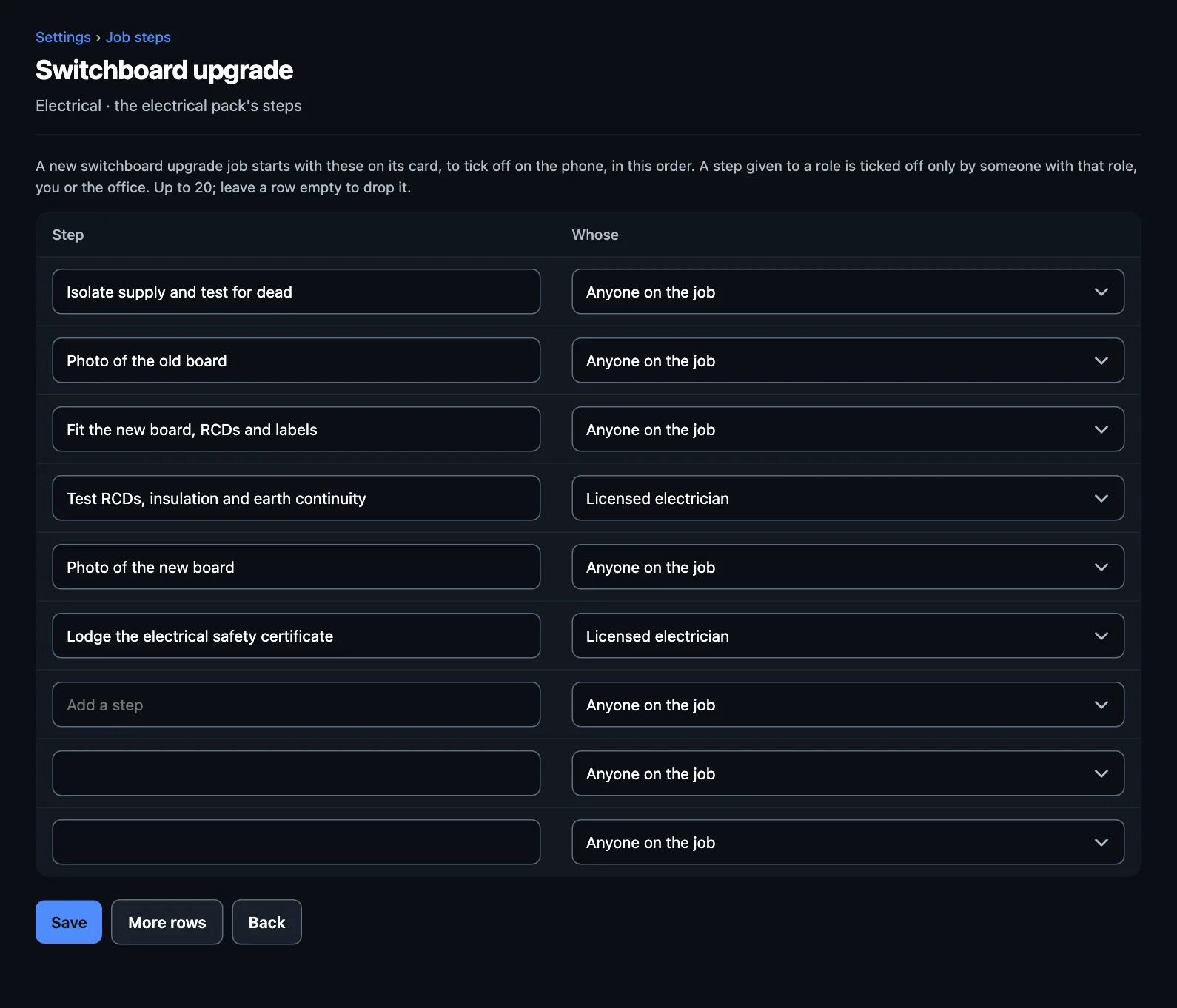
New jobs of that kind start with your steps. Jobs already made keep theirs.
Changed your mind? Use the pack's steps puts your trade's back.
Steps that belong to one role
Some steps should only be done by the right person, such as testing a new switchboard or signing off a plan. Give that step a role and only someone with that role, the owner or the office can tick it off. Everyone else sees it, but can't tick it.
Roles come from Your team and roles. If you'd like a new one, make it there first.
On the job
- Ticking off: tap a step on the job card, or say it to Tell Foreman: "Isolated and tested for dead."
- An extra step for this job only: press Check on the card and say or type it.
- Marking it done early: if steps aren't ticked, the app asks if you're sure.
Steps can start automations
An automation can start when a particular step's ticked off, or when all of a job's steps are. For example, some trades come with Tell the office a certificate's lodged, so the customer gets their copy. It looks for the step's words, so if you reword that step, update the automation as well.
Your trade's steps
This is what a new business starts with. Open a trade to see its kinds of job.
These are a starting point, not a compliance checklist. They haven't all been reviewed by someone licensed in each trade, and the rules differ by state. Check them against what you have to do, and change them to suit.
Building
Bathroom renovation
- Sign the contract and take the deposit
- Book the trades: plumber, electrician, waterproofer, tiler
- Strip out and photo the walls and floor
- Check the waterproofing before tiling (Licensed builder)
- Fit-off and clean
- Walk through it with the customer and list any defects (Licensed builder)
Kitchen renovation
- Sign the contract and take the deposit
- Confirm the cabinet and benchtop order and delivery
- Strip out, and cap off the services
- Install the cabinets and benchtops
- Fit-off with the plumber and electrician
- Walk through it with the customer and list any defects (Licensed builder)
Extension
- Sign the contract and take the deposit
- Check the building approval and insurance are in place
- Set out and pour the footings
- Book the frame inspection (Licensed builder)
- Lock-up: roof, windows and doors
- Fit-out and fit-off
- Get the final inspection signed off (Licensed builder)
Deck
- Set out and check the levels
- Footings and bearers
- Joists and decking
- Balustrade, and check its height and gaps
- Oil or seal, and clean up
Repairs and maintenance
- Photo the damage
- Make the repair, or quote the bigger fix
- Photo the finished work and clean up
Carpentry
Deck build
- Set out and check the levels
- Footings and bearers
- Joists and decking
- Balustrade, and check its height and gaps
- Oil or seal, and clean up
Pergola
- Check whether it needs approval
- Set out and pour the post footings
- Stand the posts and fit the beams
- Rafters and roof
- Clean up
Hang doors
- Check the frame is square
- Hang the door and fit the hardware
- Check it closes and latches
- Clean up
Built-in wardrobes
- Measure up and confirm the layout with the customer
- Build or assemble the carcasses
- Install, level and fix
- Doors, drawers and hardware
- Clean up
Carpentry repairs
- Photo the damage
- Make the repair, or quote the bigger fix
- Photo the finished work and clean up
Electrical
Switchboard upgrade
- Isolate supply and test for dead
- Photo of the old board
- Fit the new board, RCDs and labels
- Test RCDs, insulation and earth continuity (Licensed electrician)
- Photo of the new board
- Lodge the electrical safety certificate (Licensed electrician)
Smoke alarm installation
- Check alarm locations against the rules for the state
- Fit interconnected photoelectric alarms
- Test each alarm and the interconnection
- Note the expiry dates
EV charger installation
- Check the supply and switchboard capacity
- Run the circuit and fit the charger
- Test RCD and earth continuity (Licensed electrician)
- Commission the charger with the customer
- Lodge the electrical safety certificate (Licensed electrician)
Power points and lighting
- Isolate the circuit and test for dead
- Fit the points or lights
- Test polarity, RCD and earth continuity
Fault finding
- Ask the customer what happened and when
- Isolate and test the circuit
- Find and fix the fault, or quote the repair
- Test before leaving
HVAC
Split system installation
- Agree the indoor and outdoor unit positions
- Mount the units and run the pipework
- Pressure test and vacuum
- Commission and record the refrigerant charged (Refrigeration technician)
- Show the customer how to use it
Ducted system installation
- Check the roof space and ceiling access
- Fit the indoor unit, ducts and outlets
- Pressure test and vacuum
- Commission each zone
- Record the refrigerant charged (Refrigeration technician)
Service and clean
- Clean the filters and coils
- Check the drain and the refrigerant pressures
- Test the cooling and heating
- Note anything to quote
Fault diagnosis and repair
- Ask the customer what's wrong and since when
- Check the error codes and pressures
- Fix the fault, or quote the repair
- Test before leaving
Landscaping
Garden maintenance visit
- Mow, edge and blow down
- Weed and prune
- Note anything the customer should know about
- Take the green waste
Turf laying
- Measure the area and confirm the turf order
- Clear and level the ground
- Lay the turf and roll it
- Water it in, and leave the customer the watering plan
Retaining wall
- Dial before you dig
- Set out and check the height (an engineer's design above the limit)
- Footing and drainage behind the wall
- Build the wall and backfill
- Photo the finished wall and clean up
Paving
- Dial before you dig
- Excavate and compact the base
- Lay and cut the pavers
- Sand the joints and seal if asked
- Clean up
Irrigation install
- Dial before you dig
- Lay out the zones with the customer
- Trench and lay the lines
- Fit the controller and set the program
- Test each zone and show the customer
Painting
Interior repaint
- Confirm the colours and finishes with the customer
- Cover the floors and furniture, and mask up
- Patch, sand and prep
- Undercoat where needed, then two top coats
- Walk through it with the customer and touch up
Exterior repaint
- Confirm the colours and finishes with the customer
- Check for lead paint in older homes
- Pressure wash and let it dry
- Scrape, sand, fill and prime
- Two top coats
- Walk through it with the customer and touch up
Roof painting
- Set up fall protection before going on the roof (Painter)
- Pressure clean the roof
- Prime and two coats of roof membrane
- Photo the finished roof and clean up
Deck staining
- Clean and sand the deck
- Let it dry
- Two coats of stain or oil
- Clean up
Feature walls and touch-ups
- Confirm the colour with the customer
- Mask up, prep and paint
- Clean up
Plumbing
Hot water system replacement
- Isolate water and gas or power
- Drain and remove the old unit
- Fit the new unit and the tempering valve
- Test the relief valve and the temperature
- Lodge the compliance certificate (Licensed plumber)
Blocked drain
- Find the blockage
- Clear it (jet or eel)
- Camera the line if it comes back
- Flush and check it runs freely
Leak detection and repair
- Find the leak
- Isolate the water
- Repair and pressure test
- Check for water damage to note
Gas fitting
- Isolate the gas
- Fit the appliance or pipework
- Test for leaks (Gasfitter)
- Lodge the gas compliance certificate (Gasfitter)
Backflow prevention device test
- Test the backflow device
- Record the results
- Send the test report to the water authority
Roofing
Roof leak repair
- Set up fall protection before going on the roof (Roofer)
- Find the leak and photo it
- Make the repair, or quote the bigger fix
- Photo the repair
- Clean the gutters around it
Roof restoration
- Set up scaffolding or edge protection (Roofer)
- Pressure clean the roof
- Replace broken tiles and re-point the ridges
- Prime and two coats of membrane
- Clean the gutters and photo the finished roof
Re-roof in metal
- Set up scaffolding or edge protection (Roofer)
- Check for asbestos before stripping the old roof
- Strip the old roof and check the battens
- Sarking, then the new sheets, flashings and ridge
- Gutters and downpipes
- Issue the roof compliance certificate (Roofer)
Gutter and downpipe replacement
- Set up fall protection (Roofer)
- Remove the old gutters and check the fascia
- Fit the new gutters with the fall to the downpipes
- Fit the downpipes and test with a hose
- Clean up
Gutter clean
- Set up fall protection (Roofer)
- Clear the gutters and downpipes
- Photo before and after, and note any damage
- Take the debris away
Solar and batteries
Rooftop solar installation
- Apply to the network for connection approval
- Set up fall protection before going on the roof (Accredited installer)
- Mount the rails and panels
- Install the inverter, isolators and labels (Accredited installer)
- Test and commission the system (Accredited installer)
- Set up the monitoring app with the customer
- Lodge the electrical safety certificate (Accredited installer)
- Submit the rebate (STC) paperwork (Accredited installer)
Home battery installation
- Check the switchboard, the inverter and where the battery can go
- Apply to the network if the system's changing
- Install the battery and its isolation (Accredited installer)
- Test and commission, including backup if fitted (Accredited installer)
- Set up the monitoring app with the customer
- Lodge the electrical safety certificate (Accredited installer)
- Submit the rebate paperwork (Accredited installer)
Inverter replacement
- Photo the old inverter and its fault codes
- Isolate the system and test for dead (Accredited installer)
- Fit the new inverter
- Test and commission (Accredited installer)
- Reconnect the monitoring
- Lodge the electrical safety certificate (Accredited installer)
Solar system check and panel clean
- Set up fall protection (Accredited installer)
- Check the panels, mounts and cabling, and clean the panels
- Check the inverter and isolators, and read its output
- Note anything to fix, and quote it
Solar fault finding
- Ask the customer what's changed and read the monitoring
- Check the inverter's fault codes and the isolators
- Find and fix the fault, or quote the repair
- Test before leaving
Surveying
Identification (boundary) survey
- Search the title and the survey plans
- Locate the boundary marks on site
- Compare the improvements with the boundaries
- Draw up and send the report (Drafter)
Contour and detail survey
- Confirm the extent and the datum
- Pick up levels and features on site
- Process the field data
- Draw up and send the plan (Drafter)
Building set-out
- Check the approved plans and the boundaries
- Set out the pegs and the offsets
- Record the set-out
- Sign off with the builder (Registered surveyor)
As-constructed survey
- Survey the works as built
- Compare them with the design
- Draw up and send the plan (Drafter)
Subdivision survey and plan
- Search the titles and the plans
- Field survey and mark the new lots
- Prepare the plan of subdivision
- Lodge the plan with the land registry (Registered surveyor)
Strata or community title plan
- Inspect and measure the lots
- Prepare the strata plan
- Lodge the plan with the land registry (Registered surveyor)
Drafting and plans
- Confirm the brief and the scale
- Draft the plans (Drafter)
- Check and send to the customer